
Session reminders for personal trainersthat go out while you coach
Stop typing the same 'see you tomorrow' message every evening. CoachOne sends session reminders for personal trainers automatically, along with reminders for bookings and payments and the follow ups you set for each client.
iOS · Free to use
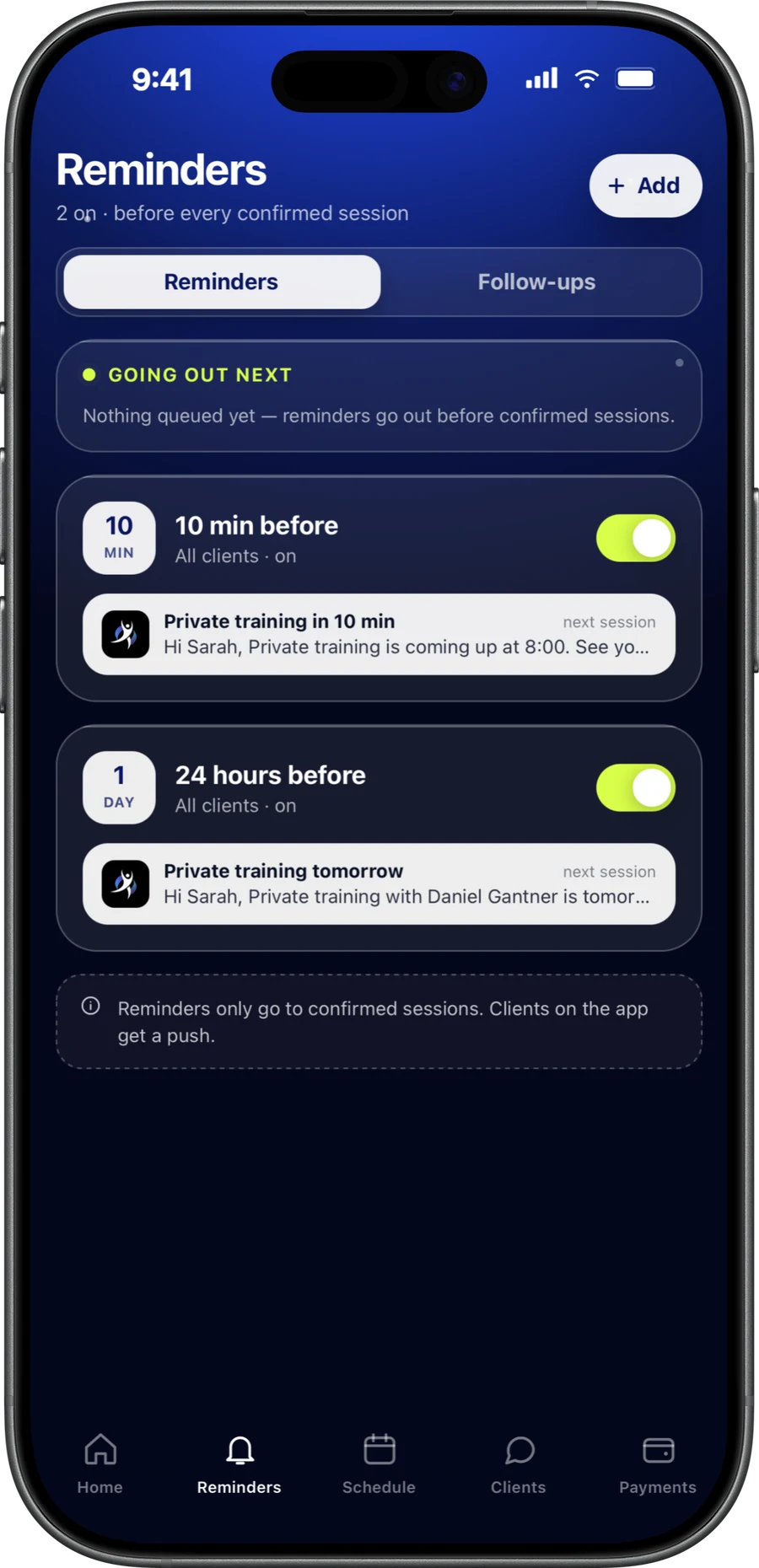
Before every session.Sent for you.
CoachOne sends an automatic reminder before each session, for example 24 hours and 1 hour before it starts. Clients who use the CoachOne app get a push notification.
Clients who booked online through your link, without the app, get their reminder by email instead. Either way, nobody has to remember to send it.
A reminder the day before gives a client time to cancel or reschedule properly instead of simply not turning up. The hour before gets them out the door.
- Session reminders, for example 24 hours and 1 hour before
- Reminders for bookings and payments, not only sessions
- Push in the app, or email for clients who booked through your link
- Follow ups that go to clients, once or on repeat
Reduce no-showswithout nagging anyone.
A reminder will not stop every no-show. It does take 'I forgot' off the table, and the rest comes down to clear rules.
Two well timed nudges
One reminder a day ahead, one an hour ahead. Clients hear it from CoachOne, by push or by email, so you are not the one chasing them.
A policy they saw first
Your cancellation policy appears before every booking. This cancellation policy template helps you write one that is fair to both sides.
A card hold in place
Every card booking is backed by a hold on the client's card before the session starts. What happens on a no-show is set by your own policy, so decide it before it happens.
Status clients can check
Clients see whether each upcoming session is confirmed, pending or cancelled, which answers 'are we still on?' before anyone asks.
Follow up with clientsat the right moment.
A follow up is a message to your client, not a note to yourself. Pick a client or a session, choose when it goes out, and CoachOne sends it on its own.
For a client
Ask a new client how their first week felt, or how the race they mentioned went.
For a session
Tie a follow up to a session, for example a note about what to bring, and it goes out at the time you chose.
Once or on repeat
Send a one time message next Friday, or a monthly one asking a regular when they want to book next.
Quiet clients
Clients with no recent session get a nudge to book again, before a short break turns into a long one.
Set it up once.Then get back to coaching.
Check your session reminders
Open the Reminders screen and make sure the 24 hour and 1 hour reminders are switched on.
Set your cancellation policy
This is what clients see before they book. Draft one with the cancellation policy generator, then adjust it to your sessions.
Add follow ups where they matter
Set them for new clients after a first session, and for regulars who should hear from you on repeat.
Start the day on your dashboard
Pending booking requests and payments waiting for your confirmation are listed there, ready when you open the app.
Session reminders for personal trainers,built into booking.
A standalone appointment reminder app only knows what you type into it. In CoachOne, reminders come from the bookings, payments and client records you already keep there.
Each client also has one chat with you inside CoachOne. Bookings and reschedules show up right in that conversation, so a moved session never gets lost in another app.
When you want to say something personal, write it in the chat. Follow ups take care of the messages you would send on a schedule. There are no group chats, broadcasts or marketing emails.
Questions aboutreminders.
With CoachOne you do not send them yourself. Session reminders go out automatically, for example 24 hours and 1 hour before, as a push in the app or an email for clients who booked through your link.
They take forgetting out of the picture, which helps. How much depends on your clients, so pair reminders with a clear cancellation policy shown before booking.
Yes, if they booked through your link. They get the reminder by email, while clients who use the CoachOne app get a push notification.
Yes. Automatic reminders cover payments as well as sessions and bookings. Your dashboard also lists payments waiting for your confirmation, such as cash.
Yes. Pick the client or a session, choose when it goes out, once or on repeat, and CoachOne sends it to the client on its own.
By push notification in the CoachOne app, or by email for clients who booked through your link. CoachOne does not send marketing emails.
Yes. Every client has one chat with you, and their bookings and reschedules show up in the conversation. There are no group chats or broadcasts.
Write a cancellation policy, make sure clients see it before booking, and keep session reminders switched on. With card bookings, a no-show is handled by your own policy.
Your next clientcan book tonight.
Download CoachOne, set your usual hours, and share your link.
iOS · Free to use